





Everything Ferri does.From the first question to the last thank-you.

Answers come first: sourced, on every app, learned from your crew. Around them, Ferri carries the crew's decisions out to every group, looks after people who are stuck, keeps scams out, and helps you plan the event and wrap it up.

Answers, sourced and learned

An answer with a source, or a straight “I don't know yet”.

Ferri answers only from your event's info and the answers your crew gave it, and names where each answer came from. When nothing fits, it says it's checking with the team, and never guesses.

  • A source line under every answer. The check is in code, so no prompt can switch it off.
  • Notices questions nobody addressed to it, waits a moment so a person can answer first, and steps in only when it has a sourced answer.
  • Every answer the crew gives is saved, so the next person who asks gets it at once.
  • The crew can teach it directly: @ferri remember: lockers are on the 2nd floor
  • Never answers the same message twice.
#build-night, nobody mentioned Ferri
neha.dev
does anyone know the wifi password?

a short wait, so a person can answer first

Ferri
The Wi-Fi network is LanternGuest and the password is buildnight2026.
Source: Lantern Build Night FAQ (Wi-Fi)
Each group gets a mode
Off
Ferri stays out of it.
Listen
Reads and learns. Never posts.
Approve
Every reply waits for an organizer's OK.
Auto
Answers with sources on its own.

The crew loop

Answered once. Sent to everyone who asked.

When Ferri doesn't know, the attendee hears “I'm checking with the team” at once, and one card opens for the person on the crew who owns that topic.

ferri-crew, the crew's private room
Card A1venue · for Priya3 waiting
Can I bring my dog?
Also asked as “are pets allowed at the venue?”
A1 “Yes, dogs are welcome on a leash”
  • @meera Yes, dogs are welcome on a leash.
  • @arjun Yes, dogs are welcome on a leash.
  • @kiran Yes, dogs are welcome on a leash.
Nobody answers? The card climbs a ladder.
  1. Card opens. The topic owner gets it, with a push.
  2. Nudge. The owner is reminded.
  3. Escalate. The whole crew sees it.
  4. Unanswered. Marked as such. Ferri never makes one up.
  • Cards go to whoever owns the topic: food to the food lead, judging to the judging lead. Owners come from the crew list and the plan.
  • The same question in other words joins the same card, so the crew answers it once.
  • Answer on the card, from Desk, from your phone, or just tell Ferri in the crew room.
  • One answer reaches everyone who was waiting, on their own app, with a real mention.
  • Pocket buzzes only the owner's phone. When someone else answers, the buzz changes to “Answered by Priya”.
A room for each job

@ferri make a judging desk with arjun makes a private channel with its own instructions and a live sheet Ferri keeps from what people say (“Team Alpha 8 for innovation”). Eleven desks come with Ferri. See them per event.

Announcement, waiting for one OK
Drafted from Rudra in ferri-crew

Heads up: lunch moves to 1:30 PM today. Same place, the 2nd floor lounge.

Goes to 5 groups
  • build-night
  • Lantern Build Night
  • build-night
  • Build Night group
  • team-alpha · in Hindi
Post itDon't post
Times change? @ferri change the lunch announcement, it's 1:45 now and one more OK edits the posts in place.

Reach

Say it once. Every app hears it.

What the crew decides becomes an update outside after one OK: posts in every group, emails to guests, social posts and partner emails. Each waits on one card.

  • Posted to every group of the event on Discord, Telegram, Slack, WhatsApp and Mattermost, and saved so answers use it from then on.
  • Edited in place on Mattermost, Slack, Discord and Telegram, never a confusing second post.
  • Scheduled posts go out at their time once approved. Not approved in time, not sent, and the crew is told.
  • A group with its own language gets its own translation, shown on the same card.
  • When the crew settles something in chat, Ferri offers the announcement, credited to whoever decided.

Guests and RSVPs

One guest list per event, from the event site, Luma or a pasted CSV.

  • Reminders and “can you still come?” as one personal email per guest, after one OK
  • Guests answer on a public RSVP page, or just reply to the email
  • A freed spot is offered to the next person on the waitlist

Social posts through Buffer

One card holds a post for LinkedIn, X and Instagram, each sized for its network.

  • Post it, schedule it, or save as Buffer drafts
  • The Builder's poster goes along as the image
  • Nothing reaches Buffer before the crew answers

Partner outreach by email

Sponsors, venues and colleges, written to from your own address.

  • The Builder finds partners, with an address only when a page publishes it
  • Every email waits on a card with To, Subject and the whole body
  • Replies land on the contact's timeline. “No thanks” means never again

Care

Some people need a person, not an answer.

Ferri reads every message for attendees who are confused, stuck, upset or unsafe, and hands each one to the right person on the crew as a case.

  • Each case has a plain reason the crew can read at a glance, and an owner: the topic owner, else whoever is on duty, else the leads.
  • Unsafe (harassment, a threat, a medical problem) is always urgent: the person on duty and every lead get a push.
  • A case stays open until it's solved. One with no news gets a check-in.
  • The crew's own words reach the member. Ferri never posts an empty “sorry you're upset” itself.
  • Technical cases can go to the Builder, which helps the member step by step in their own room and never asks for passwords or keys.
  • Turn care on or off per community, event or group.
ferri-crew · Care
Case 3teams · owner Rudra · Discord

Meera is frustrated and feels ignored: she asked twice where her team should sit and got no reply.

I'm on itSend the BuilderSolvedNot a case
Rudra writes back, Ferri delivers it to Meera as the crew's words
A64 “Meera, I am coming to you right now. Please stay by the registration desk.”

Safety

Scams stopped before anyone clicks.

Shield checks every message on every app, from people and from agents, before anyone sees it. It answers in 2 to 9 ms, with no model in the path.

Shield · what it stopped
  • Scam link
    “free nitro” with dlscord-gift[.]com
    Blocked
  • Link flood
    the same link 3 times in 2 minutes
    Blocked
  • Leaked key
    an API key, replaced with [redacted]
    Redacted
  • Your event site
    allowed when the Builder ships it
    Allowed
  • Blocks scam and lookalike links, punycode tricks, “seed phrase” bait, and anything on your block list. The message never reaches the group.
  • The same link posted three times in two minutes is blocked as a flood.
  • API keys, tokens and passwords become [redacted], in attendees' messages and in Ferri's own posts.
  • The crew hears about it with the domain defanged, never the secret, and the leads get a push.
One pause for everything
One switch in Desk stops every post everywhere. Questions are still logged, and the crew's answers go out when you lift it.
One OK for anything that goes outside
Announcements, guest emails, partner emails, social posts, listings and deploys each wait on a card. No tap, nothing happens.

Builder

A second pair of hands that asks first.

Ferri Builder is a coding agent that Switch runs on your own machine. It makes the things you'd stay up making, and every public step waits on a permission card.

The event site

  • Registration with a capacity, a waitlist and “Free my spot”
  • Schedule, FAQ, rules and sponsor credit claiming
  • Deploys to Vercel only after “Allow”

Posters and social cards

  • Six formats from one design, from A4 print to story
  • Every word, date and venue drawn exactly, no typos
  • The QR code is read back from every image

The Luma listing

  • Filled in the Builder's own browser, with a screenshot first
  • Submitted only after “Allow once”
  • Ferri never types, sees or keeps a password
  • Ask in the crew room: @ferri get the builder to make a one-page site for Build Night
  • It reads the event's facts from the room's Switch documents and leaves anything missing as a visible placeholder.
  • Its own Switch budget: 400k output tokens and 60 turns per 24 hours by default. When it's spent, Switch stops it and Ferri holds new jobs.
  • It also helps attendees with setup and build errors in the help desk.
Builder wants to run a command
$ vercel deploy --prod

Nothing goes live until someone on the crew allows it, in the room, in Desk or in Pocket.

Allow onceNo

Plan and Wrap

Before the first attendee. After the last one.

The crew talks the way it always does. Ferri turns that chatter into a plan beforehand, and counts what really happened afterwards.

Crew chatter becomes a plan
@ferri draft the agenda
  • Decisions, owners, and tasks with deadlines, picked up from the crew room. Nobody fills in a form.
  • A run of show, plus one card per key decision still open
  • Owners named in the plan get that topic's questions
  • Reminders with a push when a task falls due
  • “@ferri what's the plan?” sums up what's decided, waiting and due next

A recap with real numbers

@ferri how did build night go?
  • Questions, cards, cases, guests, check-ins and Shield, counted in code from the database
  • Short lessons, with any sentence whose number isn't in the counts dropped
  • Partners saved to Contacts. Nobody is emailed
  • A starter kit, so the next event starts from what this one learned
  • A close card that turns the groups off or moves them to the next event

An hour after the event ends, Ferri proposes the recap, the close card and a thank-you announcement on its own, once. Each waits for its OK.

Desk and Pocket

A control room for the crew. A buzz on the right phone.

Desk is where organizers run Ferri, from the laptop. Pocket is the crew's phone app, inside Desk, with the cards that need you and one big box to answer them.

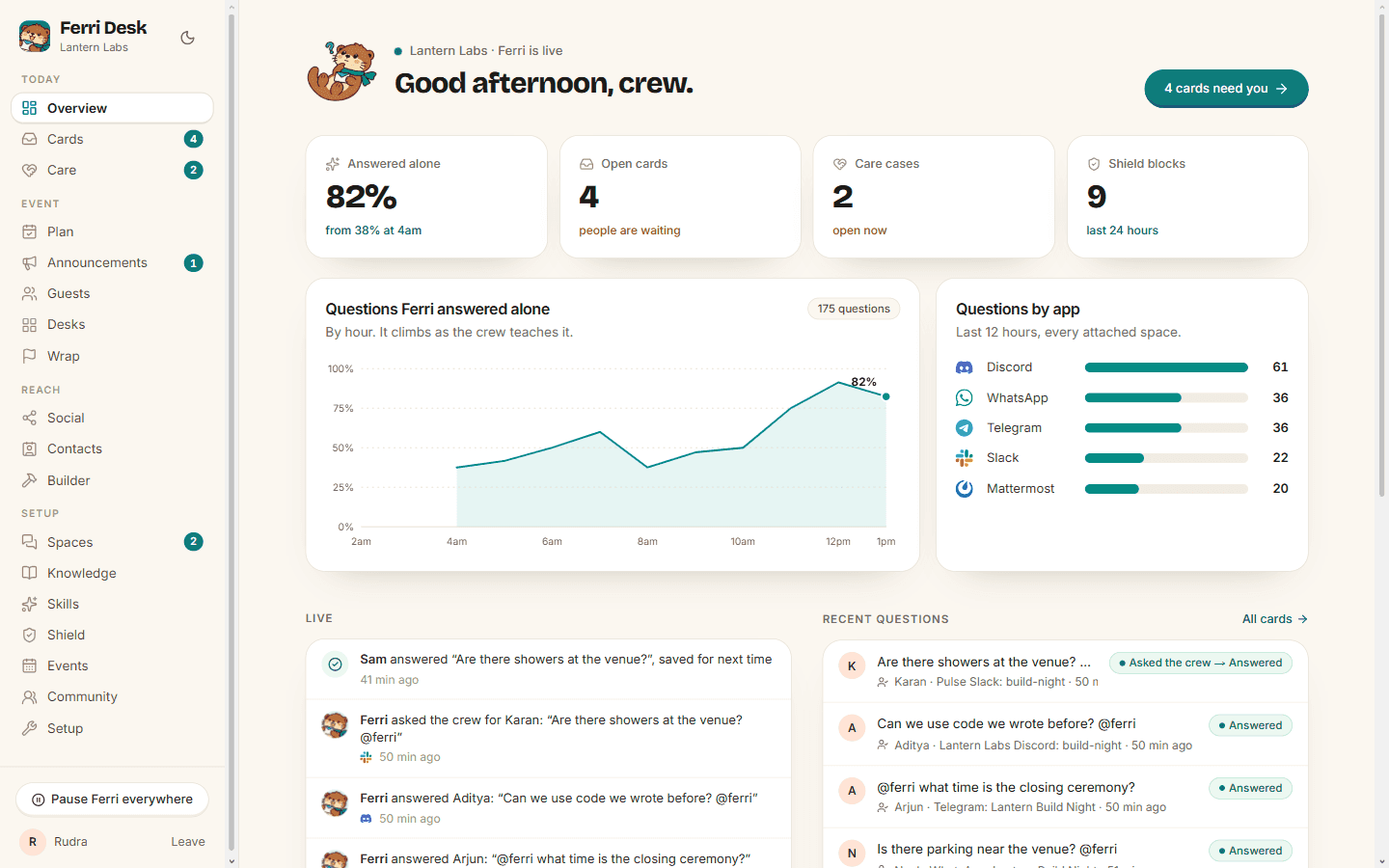
Ferri Desk's overview: the share of questions Ferri answered alone climbs by hour, questions per app, open cards, care cases, Shield blocks and a live feed.

In Desk

  • Spaces on every app, with their mode
  • The master pause
  • Cards waiting for the crew, and replies to approve
  • Knowledge, searchable, with every version kept
  • Plan, announcements, care cases and guests
  • Social posts, desks and their sheets, contacts
  • Wrap, skills and settings
  • The Builder, Shield, and a Setup page
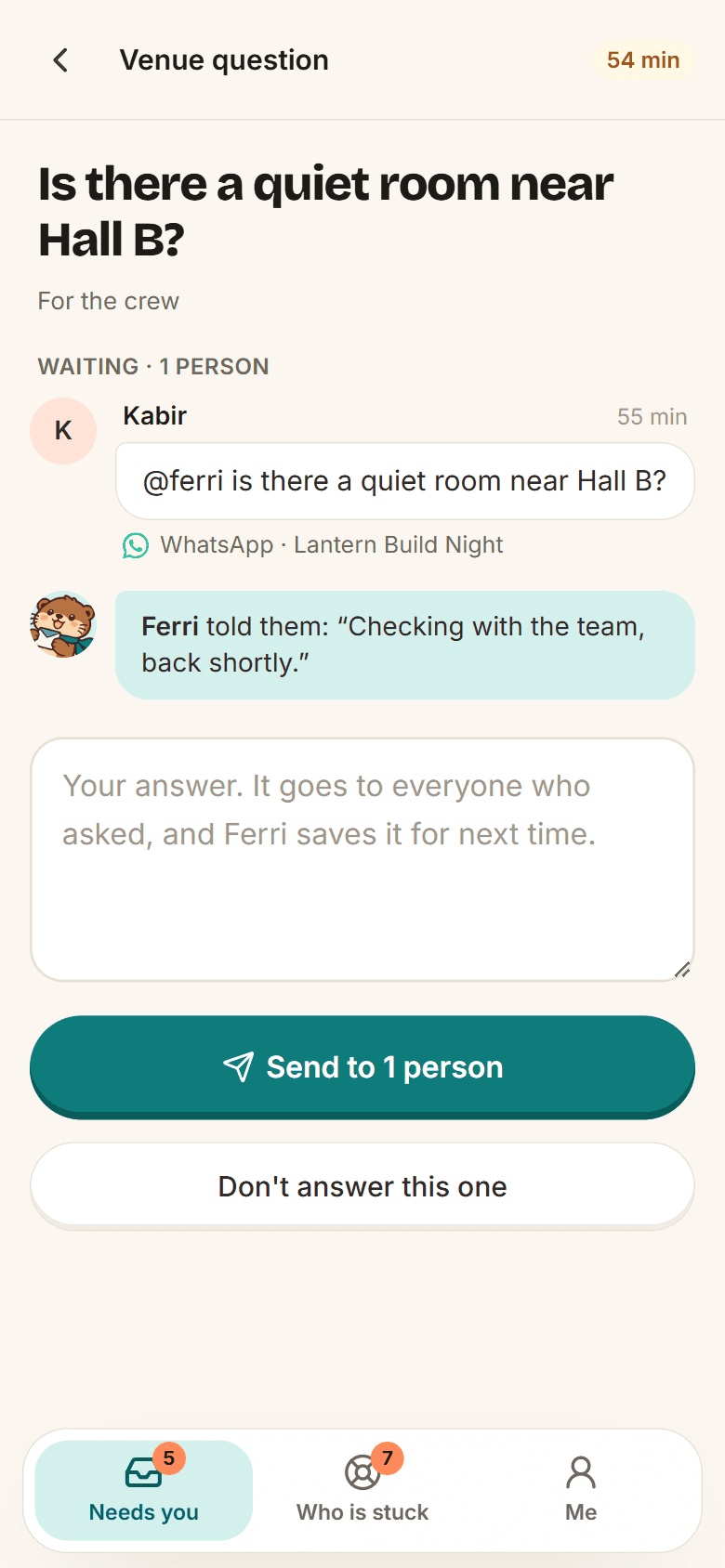
Ferri Pocket on a phone: a member's question, Ferri's holding reply and one big answer box.

In Pocket

  • Needs you: the cards for your topics first
  • Answer, or Send, Edit and Don't send
  • Who is stuck, longest first
  • A push when a card opens, at the nudge and at escalation
  • + Announce, straight from your phone

Make it yours

Your tone. Their language.

Ferri's persona, its answer rules, every desk and every pack are markdown skills the crew edits in Desk. Tone, language and timing go per community, event or group.

  • Edit any skill in Desk, with versions and “Reset to default”. Ferri uses the edit on its next message.
  • Tone: warm, playful, professional, brief, or the crew's own words.
  • A group with its own language gets answers in it, with the source label translated too.
  • Timing: how long Ferri waits in the room, the card ladder, guest reminders and wrap.
  • The source check, the cards and the pause are in code, so no edit can turn them off.
ferri-crew · settings by chat
Rudra
@ferri reply in Hindi in team-alpha
Ferri
Done. team-alpha gets answers in Hindi from now on. Say “@ferri reply in English in team-alpha” to undo.
More you can say in the crew room
  • @ferri be more playful for Build Night
  • @ferri wait a minute before answering questions in the room
  • @ferri turn off care for Build Night
  • @ferri what are the settings?

Changes work only from the crew's rooms, say who made them, and can be undone.

See it answer. Then run your own.

Ask the live demo something about Lantern Build Night, a made-up event. Then ask something it can't know, and watch it check with the crew.

Or ask in the demo groups:DiscordTelegram